Android Firewall Donate 2.3.5 build 235 APK
Android Firewall - Donate v2.3.5 build 235 APK
Requirements: 2.2 and up
Overview: This is a fork of the popular application Droidwall that uses iptables to limit data usage and add security to Android. Droidwall was originally created by developer Rodrigo Zechin Rosauro.

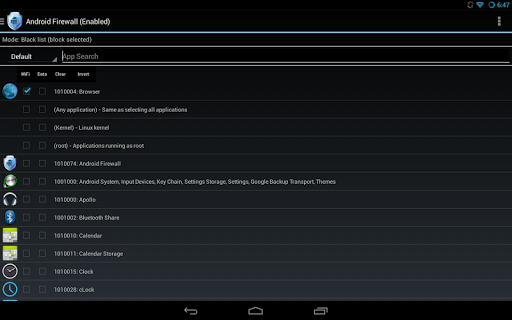
The app was discontinued and did not function correctly on Android 4.x. So I decided to fix it.
***ROOT ACCESS IS REQUIRED***
If you don't know what ROOT ACCESS is please read this: _http://en.wikipedia.org/wiki/Android_rooting
Android Firewall has all of the capabilities of Droidwall. It supports Android 2.2 and greater.
A firewall on Android is a great tool when it comes to the tiered data plans carriers have moved to and that's not even talking about the added security a firewall brings.
If you install Android Firewall and find that the software does not work correctly please install BusyBox and a Terminal Emulator. Both applications can be found on the Play Store. Open the Terminal Emulator and type "busybox route" without the quotes. Please send an e-mail to me with the output from that command to help in my troubleshooting.
You can also post issues or requests on my Github. _https://github.com/skullone/
NOTE: HTC Thunderbolt users on Android 4.x ROMS can now block cellular data if you are running ROM's based on Liquid MR3.
Android Firewall is open source software under GPL v3.
Android Firewall source code is available here: _http://github.com/skullone/android_firewall
Profile instructions
Profiles are based off of exported rules files. The rules files contain ALL settings and not just app rules. This means things like Notifications, IPv6, Logs can be controlled by the profile as well. You can have up to 6 different profiles. They can be quickly activated by the drop down spinner.
1. Set up your rules.
2. Set up your options.
3. Export your rules.
4. Menu -> Profile Management -> Create Profile
5. Choose which profile you want to create/modify.
6. Choose the rules file you want to assign to that profile.
7. Load the profile through the menu or through the spinner drop down.
What's New
Changes in 2.3.5:
Sorry for the delay. Real life events put AF on the backburner for a few months. Check change log in app for full list of changes.
Fix for VPN issue on Android 4.4.
Better SDcard Support.
FAQ section added.
Ability to change color of system apps.
Disabled apps no longer appear.
Added protocol type to logs.
Fixed issue where some devices could not send error report.
New languages added.
NFLOG service now starts correctly after a reboot.
Fixed bug in Android L for error report.
Download Instructions:
Android Firewall Donate v2.3.5.build.235.apk - 2.0 MB
Requirements: 2.2 and up
Overview: This is a fork of the popular application Droidwall that uses iptables to limit data usage and add security to Android. Droidwall was originally created by developer Rodrigo Zechin Rosauro.

The app was discontinued and did not function correctly on Android 4.x. So I decided to fix it.
***ROOT ACCESS IS REQUIRED***
If you don't know what ROOT ACCESS is please read this: _http://en.wikipedia.org/wiki/Android_rooting
Android Firewall has all of the capabilities of Droidwall. It supports Android 2.2 and greater.
A firewall on Android is a great tool when it comes to the tiered data plans carriers have moved to and that's not even talking about the added security a firewall brings.
If you install Android Firewall and find that the software does not work correctly please install BusyBox and a Terminal Emulator. Both applications can be found on the Play Store. Open the Terminal Emulator and type "busybox route" without the quotes. Please send an e-mail to me with the output from that command to help in my troubleshooting.
You can also post issues or requests on my Github. _https://github.com/skullone/
NOTE: HTC Thunderbolt users on Android 4.x ROMS can now block cellular data if you are running ROM's based on Liquid MR3.
Android Firewall is open source software under GPL v3.
Android Firewall source code is available here: _http://github.com/skullone/android_firewall
Profile instructions
Profiles are based off of exported rules files. The rules files contain ALL settings and not just app rules. This means things like Notifications, IPv6, Logs can be controlled by the profile as well. You can have up to 6 different profiles. They can be quickly activated by the drop down spinner.
1. Set up your rules.
2. Set up your options.
3. Export your rules.
4. Menu -> Profile Management -> Create Profile
5. Choose which profile you want to create/modify.
6. Choose the rules file you want to assign to that profile.
7. Load the profile through the menu or through the spinner drop down.
What's New
Changes in 2.3.5:
Sorry for the delay. Real life events put AF on the backburner for a few months. Check change log in app for full list of changes.
Fix for VPN issue on Android 4.4.
Better SDcard Support.
FAQ section added.
Ability to change color of system apps.
Disabled apps no longer appear.
Added protocol type to logs.
Fixed issue where some devices could not send error report.
New languages added.
NFLOG service now starts correctly after a reboot.
Fixed bug in Android L for error report.
https://play.google.com/store/apps/details?id=com.jtschohl.donate.androidfirewall
Download Instructions:
Android Firewall Donate v2.3.5.build.235.apk - 2.0 MB
NOTE:
If you feel difficult to download from tusfiles, please try UC Browser, you can download it HERE (DIRECT LINK)
(I personally use it to download file from tusfiles, and so far this is ok without problem.)
Tags: Firewall, Connection Manager, Internet Manager


Comments
Post a Comment